
1.1.1 When might I consider using a puff model instead of a plume model?
From a technical standpoint, while a puff model may be used for most applications where a plume model is appropriate, the additional resources involved in application of a puff model may not always be justified. The technical decision on whether a puff model is more appropriate for a particular application than a plume model should be based on considerations of whether the straight-line, steady-state assumptions on which a plume model is based are valid. This may include considerations of the transport distances, as well as the potential for temporally and/or spatially varying flow fields due to influences of complex terrain, non-uniform land use patterns, coastal effects, and stagnation conditions characterized by calm or very low wind speeds with variable wind directions. For cases involving a high degree of spatial variability of the flow within the boundary layer, such as upslope or downslope flows or flows along a winding river valley, the straight-line, steady-state assumption may not be valid beyond even a few kilometers, and a puff model may be more appropriate. Another consideration in deciding whether a puff or plume model is more appropriate for a particular application is whether the full spatial and temporal distribution of pollutant impacts is important, such as when using the model results for a risk assessment, or whether the results are to be used for a criteria pollutant analysis where the only the high end of the concentration distribution is important, regardless of time or space.
1.1.2 I have an input control file from an earlier version of CALPUFF, and want to use it with the most recent version. Will my control file be compatible with the new version? If not, what changes will I need to make to the inputs?
The new version of CALPUFF (and its pre- and post-processors) include certain revisions to the algorithms and associated changes to the variables and variable names. Some variables have been added to the new version, while some others have been dropped. Therefore, input control files from older versions, especially the earlier versions of CALPUFF (versions 3 and older), may not be compatible with the latest version of the model, and should be updated.
The user should make the necessary changes to the individual control files via an ASCII text editor. Sample control files are provided for each processor and are detailed in the model documentation.
1.1.3 Explain the rules for formatting the input option files for the different programs that make up the CALPUFF modeling system. Is the order of inputs in the input option file important?
The inputs for the CALPUFF modeling system can be created through the use of an ASCII text editor. When using a text editor, the rules for formatting the input control files are described in the applicable user's guide. The rules provide considerable flexibility on the formatting of the control file and allow for use of extensive documentation of the options selected through comments within the file. The input control files incorporate extensive self-documenting statements that describe the various input options and, where applicable, list the default values for the options. While these documentation statements are not required, they provide useful information especially when using a text editor to modify an input file. The user should note that although the input control file is limited to 132 characters per line, continuation lines are allowed. Also, there is a limit of 70 characters on the filenames (including the path) specified within the input control file.
The selected options are delimited within the control file by exclamation marks (!), along with the option name, e.g., the following string specifies the selection of the option for ISC-type of terrain adjustment: ! MCTADJ = 1 !. With the exception of the first three lines of the input control files (which are treated as run titles), any information outside the exclamation marks is considered documentation and ignored by the model during execution. Therefore, the users may add additional comments within the input control file as needed to describe the inputs.
The input control file for each program is organized into a number of Input Groups and Subgroups, and these must appear in order within the input file. Within each Input Group or Subgroup, the order of inputs is not important. Each Input Group must end with an Input Group terminator that consists of the word END between two delimiters, i.e., !END!. If the terminator is missing, or if it is out of place, the model will not find a match between the current variable name read from the control file and the dictionary of variable names for the current group or subgroup, and report this as a fatal error.
1.1.4 What is the maximum file size for CALMET/CALPUFF data, and is this limit compiler dependent?
The maximum file size for CALMET/CALPUFF data on Windows 95/98/NT is approximately 2.1 gigabytes (231 bytes), and is dependent on both the operating system and the compiler. On more recent Windows systems and on a Unix system, there is no specific limit on file sizes.
Note that CALMET will process a simulation that results in a file larger than the size limit for a given operating system without reporting an error, however, the CALMET.DAT file will contain an end-of-file (EOF) once it reaches the limit of 2.1 GB. CALMET fields for periods that would have been written after this point are not available to CALPUFF (or PRTMET). In this case, multiple CALMET simulations are needed, as CALPUFF allows the data to be "broken" into several files of less than the limit, e.g., 12 monthly CALMET.DAT files for a full-year run.
1.1.5 What criteria do I use to determine whether I should use UTM or Lambert Conformal coordinates for my application of CALPUFF?
The decision on whether to use UTM or Lambert Conformal coordinates for a particular CALPUFF application depends on the size and latitude of the modeling domain, and on whether the use of UTM coordinates will result in enough distortion to significantly affect the results. The degree of distortion introduced by the UTM projection will increase with the size of the domain and with increasing latitude. For applications in the middle latitudes, the distortion due to use of UTM coordinates will generally become significant for modeling domains exceeding 200 kilometers on a side. Lambert Conformal coordinates take into account the curvature of the earth, and may be used for most applications of CALPUFF in the middle latitudes (30 to 60 latitudes), regardless of the size of the domain. For most applications in the US and Canada, the coordinate system is generally not an issue, and most users prefer the UTM coordinate system over the Lambert Conformal system.
1.1.6 How are calm hours treated by the CALMET/CALPUFF modeling system, and if I have a large number of calm hours for one of my surface stations should I be concerned about how it will influence the results?
The CALMET/CALPUFF modeling system has the ability to model calm hours by simulating stagnant puffs. Stagnant puffs are not dispersed via advection (since the wind speed is zero), but may still undergo turbulence-related dispersion. Furthermore, even if the measured wind speed is zero, CALPUFF accounts for other possible flow components, e.g., puff transport caused by divergence or slope flow. Therefore, the model will calculate concentrations during calm periods. Calm or very light wind conditions are often associated with high impacts and, for a given application, may result in the overall highest impacts.
Although calm hours are common at some locations, the user is advised to closely examine any data containing a large number of calm hours. The geographic location and setting of the surface station should be examined to determine if calm hours are a frequent occurrence in that area. Other considerations include whether there may have been instrument problems or malfunctions, whether the instrument type or the measurement threshold may be contributing to a large number of calm hours, and whether the wind instrument might be obstructed by a structure or terrain feature. As in any modeling application, the representativeness of the meteorological data to the region being modeled, including the likelihood of excessive occurrences of calm hours, must be evaluated.
1.1.7 I want to use CALMET/CALPUFF for a local-scale application involving complex flows. I also want the initial guess wind field to reflect mesoscale features but do not have WRF data for the time period of interest. What options are available?
The CALMET/CALPUFF modeling system currently includes the capability to incorporate three-dimensional prognostic meteorological data from the WRF model into the processing of meteorological data through CALMET. This is most commonly accomplished by using the WRF data as the initial guess for the wind field in CALMET. If WRF data are not readily available for a particular application, one option is to run the WRF model for the domain and time period of interest; however, proper application of the WRF model requires both appropriate computer resources as well as WRF expertise. If suitable prognostic data are not available, the next best option would be to use all representative upper air data that are readily available for the domain to create a spatially-varying initial guess wind field.
1.1.8 What are the considerations in developing wind field characterizations (NWS+WRF data, NWS data only, WRF data only) and what are the effects of these alternatives on modeling results?
In developing wind fields, the user must start with an initial guess field (see Section 2.7, 2 of the FAQ) which is then refined by CALMET based on local meteorological, terrain and land use data. The initial guess field is adjusted for local terrain and land use effects to generate a Step 1 wind field, and then further refined using local National Weather Service (NWS) observations to create the final Step 2 wind field.
Generally, the use of WRF data as the initial guess field will improve the overall wind field characterization. As an alternate, the WRF data can be used in CALMET as the Step 1 wind field or even as observations used in refining the Step 1 wind field. When used as the Step 1 wind field, the WRF data are assumed to already contain the significant terrain effects and are not adjusted further. When the WRF data are used as the Step 1 wind field or as observations, the user can specify how much weight to assign to WRF data as compared to the NWS data by specifying weighting factors in an optional external WT.DAT file read by CALMET. See Section 2.2.3 of the CALMET user's guide for details on the various options available for using the WRF data and how to assign the weighting factors.
Although the use of WRF data will improve model performance in many cases, the users should examine the data to ensure that the grid spacing used in creating the data is adequate for their application and the winds appropriately characterize the mesoscale flows within the modeling domain. Poorly characterized data may adversely affect the model performance.
1.1.9 Can CALMET/CALPUFF be used to simulate land/sea breeze circulations, and what special considerations exist for such an application?
A version of the CALMET/CALPUFF modeling system is currently under development including algorithms that will generate land/sea breeze circulations if conditions are favorable based on empirical parameterizations. For the current version of CALMET, if significant mesoscale circulations are present, such as land/sea breezes, then the use of prognostic mesoscale meteorological data, such as WRF or MM5, to initialize the wind field in CALMET is encouraged. Due to the sparsity of upper air stations, it is unlikely that observations alone will capture the important characteristics of such circulations; however, care should be exercised to ensure that the mesoscale data are of sufficient resolution to capture the circulations.
2.1.1 What terrain elevation data formats are supported in TERREL?
The following data formats are supported by the TERREL terrain preprocessor:
Note that the TERREL preprocessor typically calculates the average of elevations of all points available within each grid cell. Therefore, in selecting the appropriate data format to use in TERREL, each grid cell must contain at least one point, and preferably as many points as feasible. For example, for a cell size of 5 kilometers, the GTOPO30 format can be used because it has a 900-meter resolution and will therefore provide at least 25 points per cell.
2.1.2 Where can I go to get terrain heights and land use data?
Information on obtaining terrain and land use data is provided below. Please note that the availability of these data on the Internet is subject to change as new options become available or existing websites are reorganized.
Terrain height and land use data are available for the entire United States at: http://edcwww.cr.usgs.gov/doc/edchome/ndcdb/ndcdb.html. Select the "1:250K DEM" option for one-degree Digital Elevation Model (DEM) terrain data. The data can be accessed either alphabetically by filename, corresponding to the name of the USGS 1:250,000 scale topographic map, by state, or by a graphical interface. Each terrain file covers a 1-degree by 1-degree area corresponding to the eastern or western half of a 1:250,000 scale topographic map.
To access land use data, select the “LULC” option from the webpage referenced above. The 1:250K land use data can also be accessed by filename, by state, or by a graphical interface. Each 1:250K land use file covers the full one-degree (latitude) by two-degree (longitude) area corresponding to a 1:250,000 scale topographic map. If a particular land use file is indicated as not available through the graphical interface, it may still be available through one of the other options. Once you have identified a land use file for downloading, select the file entitled “grid_cell.gz” (do not select the file called “land use”), or if accessing by state, select the file identified as “grid_cell: compressed.”
The one-degree DEM data are available for all of the contiguous United States, Hawaii, and most of Alaska. Elevations are in meters relative to mean sea level. Spacing of the elevations along and between each profile is three arc-seconds with 1,201 elevations per profile. The east-west spacing is latitude dependent, varying from 70 to 90 meters for the North American continent. The one-degree DEM data have an absolute accuracy of 130 meters in the horizontal and 30 meters in the vertical. In Alaska, the spacing and number of elevations per profile varies depending on latitude. Latitudes between 50 and 70 degrees north have spacings at six arc-seconds with 601 elevations per profile, and latitudes greater than 70 degrees north have spacings at nine arc-seconds with 401 elevations per profile. The 1:250K land use data are gridded with a 200 meter spacing referenced to the UTM coordinate system.
Higher resolution terrain height data are available for some of the United States at http://edcwww.cr.usgs.gov/doc/edchome/ndcdb/ndcdb.html. Select the "1:24K DEM" option, and follow the link for the free downloads available at the GeoComm International Corporation website. The 1:24K DEM data, also referred to as 7.5-minute DEM data, are available in the Spatial Data Transfer Standard (SDTS) format. The data must be converted to the native DEM format before using the data with the TERREL preprocessor. Information on converting the SDTS data to DEM format is available on the GeoComm International Corporation website.
The DEM data for 7.5-minute units correspond to the USGS 1:24,000 and 1:25,000 scale topographic quadrangle map series for the entire United States and its territories. Each 7.5-minute DEM is based on 30- by 30-meter data spacing with the Universal Transverse Mercator (UTM) projection. Each 7.5- by 7.5-minute block provides the same coverage as the standard USGS 7.5-minute map series. The 7.5-minute Alaska DEM data correspond to the USGS 1:24,000 and 1:25,000 scale topographic quadrangle map series of Alaska by unit size. The unit sizes in Alaska vary depending on latitude. The spacing between elevations along profiles is one arc second in latitude by two arc seconds of longitude. The desired accuracy standard for 7.5-minute DEM’s is a vertical root-mean-square error (RMSE) of 7 meters in the vertical.
2.1.3 The one-degree and 7.5-minute terrain height and land-use data files are compressed and have no record delimiters. How should we process these data files for use by the CALMET utility programs running on PC's?
Step 1. As you download the required data file downloads, rename the files to have no more than 8 characters in the name, and give it a .gz extension (e.g. portland-e.gz might be renamed to porte.gz).
Step 2. Decompress the USGS files. GZIP.EXE is used to decompress each of the files by
typing the following command for each file:
gzip -d filename [return]
where, filename is the name of the USGS compressed file including the extension (i.e., porte.gz). The result of running gzip will be a file with the same name but no file extension (i.e., porte).
Step 3. Add record delimiters. Two programs are provided in the CALMET utilities:
DD_DEM.EXE and DD_CTG.EXE. DD_DEM is for processing the DEM data files, and
DD_CTG is for processing the land-use data files. You will need to process each file
downloaded and uncompressed by gzip, to add record delimiters.
dd_dem [return]
dd_ctg [return]
DD_DEM and DD_CTG prompt the user for the names of the input and output files, with no other control options, and may be used on PCs to perform the function of the DD UNIX utility described by the USGS documentation.
2.1.4 How will I know whether my terrain elevation data is sufficiently resolved (i.e., small enough grid size) for my specific application?
In making CALMET and CALPUFF modeling runs, the goal is to find the optimum balance between the desire to make the grid size as large as feasible in order to reduce the run times and file sizes, and the desire to make the grid size small enough that CALMET can characterize the terrain effects on the wind field. The optimum grid spacing for a particular application will depend on the size of the modeling domain and the complexity of the terrain within the domain.
There are some obvious checks one can make. For instance, if your application involves some terrain features (hills, valleys, etc.), CALMET needs to have at least five (preferably 10) grids to resolve each terrain feature. Thus, if you have a valley of particular interest that is typically 5 km wide, a grid spacing of 0.5 to 1-km terrain and land-use data would be appropriate.
Graphical analyses may also prove helpful. Consider the following sequence to develop three graphical analyses: 1) contour the gridded data at what you think will be your final resolution, say 2-km; 2) shift the origin of the grid by ½ of the grid scale (left or right, up or down), re-grid the data using twice the original grid scale, and contour the terrain heights, and 3) using the same grid origin as in the second case, re-grid the data using ½ the original grid scale as in the first case, and contour the terrain heights. Compare the three plots to see how terrain features are 'appearing' and 'disappearing', and decide whether you are comfortable with your original grid scale. These three steps could be repeated using a different initial grid scale, but it is important to remember that these results are subjective in natureCommon sense and experience should prevail over the temptation to over-engineer this analysis.
2.1.5 What do I do if my terrain data and/or meteorological domain cross different UTM zones?
UTM zones cover a 6-degree longitudinal width. In the range of ±45o latitude, this corresponds to a zone width (east-west direction) of approximately 470-670 km depending upon latitude (with the greatest width at the equator). In general, these zone sizes are sufficiently large to accommodate most CALPUFF domains, especially at lower latitudes. However, for applications that involve long-range transport from sources located near the edge of a UTM zone, the CALPUFF domain may extend into the adjacent UTM zone. In these cases the coordinates must be referenced to the same UTM zone so that the model can appropriately calculate the relative distance and direction between two points, e.g., between a source and a receptor. To accomplish this, the latitudes and longitudes of all points can be forced to UTM coordinates that are referenced to the same zone with the help of a conversion utility such as UTMGEO. In cases where only UTM coordinates and UTM zones are known, the UTMGEO utility can first convert the UTM coordinates of all UTM zones into latitudes and longitudes, and then re-convert them to UTM coordinates by referencing them to the same zone.
Note that the TERREL preprocessor will do the appropriate conversions of the UTM grid terrain data. However, for source locations and meteorological data stations, the user must do the conversions.
2.2.1 What land use data formats are supported in CTG and PRELND1?
The following land use data formats are supported by the CTG and PRELND1 land use preprocessors:
CTG (i.e., CTGCOMP and CTGPROC) is preferred over PRELND1 for preprocessing land use data. The ARM3 data, which require the use of PRELND1, are not readily available, and are not recommended because they are very old compared to the Global dataset.
2.2.2 Where can I go to get terrain heights and land use data?
Information on obtaining terrain and land use data is provided below. Please note that the availability of these data on the Internet is subject to change as new options become available or existing websites are reorganized.
Terrain height and land use data are available for the entire United States at http://edcwww.cr.usgs.gov/doc/edchome/ndcdb/ndcdb.html. Select the "1:250K DEM" option for one-degree Digital Elevation Model (DEM) terrain data. The data can be accessed either alphabetically by filename, corresponding to the name of the USGS 1:250,000 scale topographic map, by state, or by a graphical interface. Each terrain file covers a one-degree by one-degree area corresponding to the east or west half of a 1:250,000 scale topographic map.
To access land use data, select the 'LULC' option from the webpage referenced above. The 1:250K land use data can also be accessed by filename, by state, or by a graphical interface. Each 1:250K land use file covers the full one-degree (latitude) by two-degree (longitude) area corresponding to a 1:250,000 scale topographic map. If a particular land use file is indicated as not available through the graphical interface, it may still be available through one of the other options. Once you have identified a land use file for downloading, select the file entitled “grid_cell.gz” (do not select the file called “land use”), or if accessing by state, select the file identified as “grid_cell: compressed.”
The one-degree DEM is available for all of the contiguous United States, Hawaii, and most of Alaska. Elevations are in meters relative to mean sea level. Spacing of the elevations along and between each profile is three arc-seconds with 1,201 elevations per profile. The east-west spacing is therefore latitude dependent, varying from 70 to 90 meters for the North American continent. The one-degree DEM data have an absolute accuracy of 130 meters in the horizontal and 30 meters vertically. In Alaska, the spacing and number of elevations per profile varies depending on the latitudinal location of the DEM. Latitudes between 50 and 70 degrees north have spacings at six arc-seconds with 601 elevations per profile and latitudes greater than 70 degrees north have spacings at nine arc-seconds with 401 elevations per profile. The 1:250K land use data are gridded with a 200 meter spacing referenced to the UTM coordinate system.
Higher resolution terrain height data are available for some of the United States at http://edcwww.cr.usgs.gov/doc/edchome/ndcdb/ndcdb.html. Select the "1:24K DEM" option, and follow the link for the free downloads available at the GeoComm International Corporation website. The 1:24K DEM data, also referred to as 7.5-minute DEM data, is available in the Spatial Data Transfer Standard (SDTS) format. The data must be converted to the native DEM format before using the data with the TERREL preprocessor. Information on converting the SDTS data to DEM format is available on the GeoComm International Corporation website.
The DEM data for 7.5-minute units correspond to the USGS 1:24,000 and 1:25,000 scale topographic quadrangle map series for all of the United States and its territories. Each 7.5-minute DEM is based on 30- by 30-meter data spacing with the Universal Transverse Mercator (UTM) projection. Each 7.5- by 7.5-minute block provides the same coverage as the standard USGS 7.5-minute map series. The 7.5-minute Alaska DEM data correspond to the USGS 1:24,000 and 1:25,000 scale topographic quadrangle map series of Alaska by unit size. The unit sizes in Alaska vary depending on the latitudinal location of the unit. The spacing between elevations along profiles is 1 arc second in latitude by 2 arc seconds of longitude. The desired accuracy standard for 7.5-minute DEM's is a vertical root-mean-square error (RMSE) of 7 meters in the vertical.
2.2.3 The 1-degree and 7.5-minute terrain height and land-use data files are compressed and have no record delimiters. How should we process these data files for use by the CALMET utility programs running on PC's?
Step 1. As you download the required data file downloads, rename the files to have no more than 8 characters in the name, and give it a .gz extension (e.g. portland-e.gz might be renamed to porte.gz).
Step 2. Decompress the USGS files. GZIP.EXE is used to decompress each of the files by typing the following command for each file:
gzip -d filename [return]
where, filename is the name of the USGS compressed file including the extension (i.e., porte.gz). The result of running gzip will be a file with the same name but no file extension (i.e., porte).
Step 3. Add record delimiters. Two programs are provided in the CALMET utilities:
DD_DEM.EXE and DD_CTG.EXE. DD_DEM is for processing the DEM data files, and
DD_CTG is for processing the land-use data files. You will need to process each file
downloaded and uncompressed by gzip, to add record delimiters.
dd_dem [return]
dd_ctg [return]
DD_DEM and DD_CTG prompt the user for the names of the input and output files, with no other control options, and may be used on PCs to perform the function of the DD UNIX utility described by the USGS documentation.
2.2.4 What can go wrong when processing land use data?
Users should be aware of some problems that may occur during the processing of land use data. The occurrence of these problems may depend upon the resolution of the land use data relative to the resolution of the meteorological grid being used in CALMET. One potential problem is the presence of power lines. Since the land use code for power lines falls under the urban category, power lines may show up as thin lines of urban land use across part of the domain. Since power lines are not well represented by urban dispersion options in the model, these features should be removed from the land use data before processing the data in CALMET. Another potential problem occurs because missing land use data are initially assigned as large water bodies (land use datasets typically exclude over-ocean areas). Such missing data should be filled based on land use patterns in neighboring grid cells, or through examination of topographic maps of the area, before continuing with the processing. An actual body of water, such as a lake or large river, may become discontinuous if the meteorological grid spacing is too large relative to the resolution of the land use data. In this case, the data should be modified to better reflect the continuity of the particular water body.
2.2.5 Explain the QA threshold for processing of land use data.
The quality assurance (QA) threshold is designed to test for the number of data points available per cell. The default threshold is set to 75%, i.e., any cell that has less than 75% of the average number of data points available for all cells is flagged. The user can then investigate to determine if data are missing.
2.2.6 What do I do (or where do I go) if there is no land use data for my area of interest from the USGS website?
Global land use data with a 1 kilometer resolution is available at http://edcdaac.usgs.gov/glcc/glcc.html. Depending on the scale of the application, this data may be appropriate if the USGS 1:250K land use data are not available. Also, if the 1:250K land use data are not available through the graphical interface on the USGS website, the data may still be available through the option to select the data by filename or by state.
2.3.1 What upper air data formats are supported?
The following upper air data formats are supported by the READ62 preprocessor:
2.3.2 What are the considerations in selecting upper air sites a) for long-range transport applications, and b) for complex flow applications?
For all types of applications, the minimum requirement is that at least one upper air station must be selected. This is true even when using WRF data. In a typical application, however, the user should include all available upper air stations that are considered to be suitable. As a starting point, all stations within the modeling domain should be selected. In addition, the next nearest station outside the domain in each direction should be selected to help in the interpolation of data up to the edge of the domain. Once the stations have been identified, the user should examine the data for completeness. If significant amounts of data are found missing, the user must either consider filling in the data in some suitable manner, or, if there are large data gaps or no suitable way to fill in the missing data, the user may consider excluding that station.
For complex flow applications which often involve significant terrain features, the representativeness of data is an important consideration. In evaluating representativeness, the user should determine whether data are available at key terrain elevations that might be needed for the application. Then the switches within CALMET can be adjusted to either extract only the representative soundings from the data, or to weight each sounding based on its representativeness for the specific application. (See FAQs on CALMET switch settings.)
2.3.3 How can I tell if critical upper air data are missing?
Read62 performs the following QA checks relevant to CALMET:
The list file created by READ62 contains warning messages pointing to the missing data. The user should carefully evaluate and address each warning message.
The user is advised to pay close attention to the first sounding level of each observation. The first sounding is usually at the ground level. So, for example, if the first sounding is at a 150-meter level, the ground elevation at the station would be 150 meters. If in a subsequent measurement the soundings start at a higher elevation, this would indicate that the first level is missing.
2.3.4 How can I deal with missing soundings, e.g., if lowest levels are missing, or if the soundings do not go high enough, or if complete soundings are missing?
The user should examine the warning messages in the READ62 list file to determine the type and extent of missing data. If only certain parameters are missing, e.g., surface-level temperature, then the data can be substituted from another representative station. The representativeness of the substituted data is a key element. The most representative station may not be the nearest station. If significant data are missing in a given sounding, e.g., all data above 1 km level, , it is advisable to replace the entire sounding rather than mixing data from two different soundings. Similarly, if the entire sounding is missing, it can be replaced from another representative data set.A possible source for substitution is the nearest grid point of any available WRF or other numerical weather dataset. Vertical profiles can be extracted from processed .m3d files using the UAMAKE utility.. In some cases it may not be necessary to fill for occurrences of missing data at highest levels in the upper air soundings, if these levels are above the top of the CALMET domain defined for the application.
When substituting data, the user should always make sure that the time period of the replacement data is the same as the missing data. For example, it is not appropriate to use a 0Z sounding to replace a missing 12Z sounding. Similarly, it is not appropriate to interpolate between two 0Z soundings to obtain a 12Z sounding. The user should also make sure to adjust elevation levels between two stations when substituting data because all elevations are referenced to mean sea level (MSL).
When using data from international stations, the user is cautioned that the data may only be reported for mandatory levels, e.g., surface, 850, 750 and 500 millibar levels, and may not be appropriate to use in a given application.
2.3.5 What do I do if my meteorological data stations and/or the meteorological domain cross different time zones?
This is generally not a problem because the upper air stations are referenced to the Greenwich Mean Time (GMT). The model automatically calculates the appropriate time shift based on the required user inputs which include the reference time zone and the time zone of each station. However, if a given station is not referenced to GMT, then times must be adjusted to GMT prior to being used as input.
Similarly, the model automatically calculates the appropriate time shift for surface and precipitation data based on the user inputs.
2.4.1 What surface data formats are supported?
The following surface data formats are supported by the SMERGE preprocessor:The CD-144, SAMSON and HUSWO formats can be directly input into SMERGE; however, the DATSAV3 data must first be converted into the CD-144 format using the DATSAV program. Regarding the DATSAV data, note that only the abbreviated, space-delimited DATSAV3 format is supported, and not the full DATSAV3 format. It is currently not included on a standard CD-ROM product available from National Climatic Data Center (NCDC), and must be specifically obtained from the NCDC in that format.
The only format supported by the METSCAN program is the CD-144 format.
Note that the surface data available from the EPA's SCRAM website can be used by first converting it into CD-144 format using the MET144 program, which is also available from the SCRAM website.
2.4.2 What are the considerations in selecting surface sites, a) for long-range transport applications, and b) for complex flow applications?
Generally, the same considerations apply when selecting surface stations as when selecting upper air stations. The user should select all stations within the meteorological domain. The user should also select a number of stations outside the domain in each direction to help interpolate data up to the edge of the domain. Unless limited computer resources are available, or file size limitations are a concern, the user can select more stations than needed because the model will automatically ignore data that are not relevant.
The CALMET meteorological preprocessor allows stations with missing data to be included as input stations. For example, stations that record only daytime data or 3-hourly data as opposed to hourly data, or stations with no cloud cover data, are acceptable as input. The only requirement is that a valid value must be available for each parameter for each hour from at least one of the stations, with the exception that precipitation code could be missing from all stations. Without the precipitation code, CALMET can determine if the precipitation is frozen by using the temperature data.
Note that the surface data available from the EPA's SCRAM website can be used by first converting it into CD-144 format using the MET144 program, which is also available from the SCRAM website.
2.4.3 Can ASOS data be used with CALMET, and are there any drawbacks to using such data?
Most National Weather Service (NWS) observing stations at major airports in the U.S. have now been upgraded to use the Automated Surface Observing System (ASOS) for collecting and reporting routine weather observations, in place of data collected by a human observer. Depending on the format of surface data being used, ASOS data may be coded differently than the human observations. One important distinction for air quality modeling is that the ASOS derived cloud cover and ceiling height data are limited to detection of cloud bases below 12,000 feet. The SMERGE preprocessor for surface meteorological data can be run with ASOS data, provided the data are available in one of the supported formats (see Section 2.4, 1 of the FAQ).
An EPA study (EPA, 1997) examined the sensitivity of results from the ISCST3 model to use of ASOS data vs. use of human observer data. This study concluded that, for some applications, the model results were significantly affected by the use of ASOS data, and particularly by the limit of 12,000 feet for the ceiling height measurement. Another study (Atkinson, et al., 2000) documented a bias toward an increase in the frequency of calm winds for ASOS data as compared to pre-ASOS observations for a particular station. Since the CALMET preprocessor is typically run with data from multiple upper air and surface NWS stations, in addition to any available representative on-site data, the sensitivity of CALMET results to use of ASOS data may be expected to be more limited. As with any application of the CALMET/CALPUFF modeling system, concurrence on the selection of meteorological data, whether ASOS or not, should be obtained from the appropriate regulatory agencies.
EPA, 1997: Analysis of the Affect of Asos-derived Meteorological Data on Refined Modeling, EPA-454/R-97-014. U.S. Environmental Protection Agency, Research Triangle Park, NC. (available at http://www.epa.gov/scram001/index.htm under the Meteorological Data, Guidance menu)
Atkinson, D.G., R.W. Brode, and J.O. Paumier, 2000: Analysis of the Effects of ASOS Data on Air Dispersion Modeling. Preprints of the 11th Joint Conference on Applications of Air Pollution Meteorology, January 9-14, 2000, American Meteorological Society, Boston, MA. 2000.
2.4.4 How does CALMET handle missing surface data?
First, it is important to note that missing surface data may not be a critical flaw because CALMET allows stations with missing data to be processed. Although it is preferred to have complete data for all stations, the minimum requirement is that there must be at least one valid value for each parameter for each hour from any of the input stations. Therefore, when selecting the surface stations the user should be aware that stations with missing data (e.g., stations with only daytime data or three-hourly data), should not automatically be rejected. The user should also be aware that the selected stations should (in total) make a complete data set and cannot, for example, be all daytime-only stations because this will result in a data gap that will halt the model.
2.4.5 How can I deal with missing surface data?
During execution, CALMET generates a list of missing data which the user can examine to determine the type and extent of missing data. If a few hours of data are found to be missing, these can be filled in either by interpolation or substitution from another representative station. If large data gaps are found (e.g., if only daytime data are available from all of the input stations), the data may be deemed to be not acceptable. In such a case, CALMET will indicate that sufficient data are not available. To address this problem, the user may have to select alternate years and/or additional stations. This is one of the reasons that the user may consider selecting all available stations that are suitable for the application.
2.4.6 Does CALMET define a day as hours 00 to 23 or as hours 01 to 24, and how does CALMET and its preprocessors handle this issue for different types of input meteorological data?
The CALPUFF modeling system runs on an Hour 0-23 clock wherein Hour 0 is the midnight hour. Therefore, "Day 2/Hour 0" is the same as "Day 1/Hour 24." The data for this hour corresponds to that collected between 11 pm and 12 midnight on Day 1. This system is consistent with the "hour ending" system used in recording data in CD-144 and DATSAV3 formats. In other formats, such as SAMSON and HUSWO, the data are recorded on an Hour 01-24 basis. CALMET will appropriately process the data recorded in either format, however, and the user does not have to change the input data.
The user should note that in a full year of National Weather Service (NWS) data obtained from National Climatic Data Center (NCDC), the records run from "Day 1/Hour 0" through "Day 365/Hour 23." For a full-year model run, such as those required for regulatory applications, it is recommended that the data for last hour also be obtained and appended at the end of the data file. This last hour would be recorded as "Day 1/Hour 0" of the next year.
2.5.1 What precipitation data formats are supported in PXTRACT?
The only format supported by PXTRACT precipitation preprocessor is the National Climatic Data Center (NCDC) TD-3240 data. These data are available from NCDC in fixed record length as well as variable record length formats. Both of these formats are supported.
The user also has the option of creating a free-formatted precipitation data file that can be input directly into CALMET. This option eliminates the need to run PXTRACT and PMERGE preprocessors and is generally useful for short CALMET runs for which the data can easily be input manually. An example of the free-formatted file is provided below along with a description of the necessary inputs.
Example free-formatted (ASCII) PRECIP.DAT file
89 1 1 89 2 9 6 4
412360 417943 417945 412797
89 1 1 0.000 0.000 0.000 9999.000
89 1 2 0.000 0.254 0.000 0.000
89 1 3 0.000 0.000 0.762 0.000
.
.
.
89 2 8 0.508 0.000 0.000 0.000
89 2 9 0.000 0.000 0.000 0.254
Description of inputs required in a free-formatted (ASCII) PRECIP.DAT file
Record 1:
Starting Year/Julian Day/Hour
Ending Year/Julian Day/Hour
Time zone (5=EST, 6=CST, etc.)
Number of input precipitation stations
Record 2:
Station code for each precipitation station
Record 3:
Year/Julian Day/Hour
Precipitation rate in mm/hour for each station in order (Missing = 9999)
(Note: Each input row is limited to 132 columns and additional rows are allowed
to enter the precipitation rates for all of the stations. Record 3 is repeated for each
hour)
2.5.2 What are the considerations in selecting precipitation sites, a) for long-range transport applications, and b) for complex flow applications?
An important criterion is that the user should select as many precipitation stations as are available, keeping in mind that there usually are many more precipitation stations available as compared to surface data stations. Therefore, it is advisable to use all suitable precipitation stations within the modeling domain and in the area immediately outside the domain.
When assessing the suitability of a station, the user should determine whether the station reports hourly precipitation or accumulated precipitation. Although hourly precipitation rates are preferred, stations with accumulated precipitation can be used if accumulation periods are relatively short, say no more than six hours. The accumulated precipitation is distributed equally among all hours in the accumulation period. Since this assumption of equal distribution over the accumulation period may only be appropriate for short periods, the user should exercise caution when data are reported over large accumulation periods. For extremely large accumulation periods, say weekly accumulation, the data should generally be avoided. The user is advised to review the PXTRACT list file which lists all accumulation periods to identify any such large periods.
Note that precipitation records, such as those contained in the NCDC TD-3240 data, do not include precipitation codes, i.e., liquid vs. frozen precipitation. CALMET obtains the precipitation codes from the surface data file (SURF.DAT) and passes them to CALPUFF via the CALMET.DAT file.
For near-field applications, the user may wish to evaluate whether wet removal is an important consideration given that the transport duration may be very small. For such applications, the user can sometimes ignore precipitation data because the amount of plume material removed by wet scavenging may be negligible.
2.5.3 Can I use the hourly precipitation data from my SAMSON meteorological data file, and if so, how do I extract and merge the data with precipitation data from other stations?
Although the surface data in SAMSON format contains hourly precipitation data, currently these data cannot be read by the PXTRACT precipitation preprocessor; however, this is generally not a concern because the NCDC TD-3240 data are available for most precipitation stations, including the National Weather Service (NWS) stations for which SAMSON data are available.
2.6.1 What mesoscale data formats are supported in CALMM5?
The CALMM5 preprocessor accepts data from the NCAR/Penn State mesoscale meteorological models:
CALMM5 converts these data into either the MM4.DAT or MM5.DAT formats read by CALMET.
The MM4 data are in the Interagency Workgroup on Air Quality Modeling (IWAQM) 1990 CD-ROM format. These are available from the National Climatic Data Center (NCDC) on a 12 CD set for the whole Unites States (including southern Canada and northern Mexico) at: http://nndc.noaa.gov/?http://ols.nndc.noaa.gov/plolstore/plsql/olstore.prodspecific?prodnum=C00451-CDR-A0001. The MM4 data contain fewer parameters than the MM5 data and are appropriate to use if the additional parameters are not needed. The additional parameters contained in MM5 include cloud and precipitation data. Also note that CALMM5 only supports data created by version 2 of the MM5 model. Any data from the version 3 of the model must be converted to the version 2 format. A conversion utility is available from UCAR.
2.7.1 Which CALMET settings typically require expert judgement for tailoring the analysis for a specific application?
There are seven (7) CALMET settings one should carefully examine: BIAS, IEXTRP, TERRAD, R1, R2, RMAX1, and RMAX2. These are each discussed separately below.
BIAS - affects how the initial Step 1 winds will be interpolated to each grid cell in each vertical layer based on upper air and surface observations. The BIAS value ranges from -1 to +1, and a value is input for each vertical layer. Normally, BIAS is set to zero (0) for each vertical layer, and the upper air and surface wind and temperature observations are given equal weight in the 1/r2 interpolations used to initialize the computational domain. By setting BIAS to -1, upper-air observations are eliminated in the interpolations for this layer. Conversely by setting BIAS to +1, the surface observations are eliminated in the interpolations for this layer. An example where non-default settings for BIAS may be used is for a narrow, twisting valley, where the only upper-air observations were 100 km to the west, and the only local surface wind observations were in one location in the valley. For this example, setting BIAS to -1 within the valley forces surface data only to be used for the lowest layers and BIAS to +1 above the valley forces upper air data only to be used aloft; BIAS might range from -1 to +1 in the transitional layers at the top of the valley.
IEXTRP - affects vertical extrapolation of surface winds, and whether layer 1 data from upper air stations are ignored. It is normally is set to -4. Setting IEXTRP <0 means that the lowest layer of the upper-air observation will not be considered in any interpolations. Since upper-air observations are only taken every 12 hours, the time-interpolated surface wind values from the upper-air observations are usually of no use. When IEXTRP is set to -4, similarity theory is used to extrapolate the surface winds into the layers aloft, which provides more information on observed local effects to the upper layers. Setting IEXTRP to 0 means that no vertical extrapolation from the surface wind data is used.
TERRAD - has meaning only if IWFCOD is 1 (i.e., diagnostic winds are to be computed) and is used in computing the kinematic effects (IKINE), the slope flow effects (ISLOPE), and the blocking effects (IFRADJ) on the wind field. You can view this as the distance CALMET 'looks' at in computing each of these effects. For instance, the terrain slope is needed to compute the slope flow. If TERRAD is too small, then the nearby valley wall will not be seen. If TERRAD is too large, then the hill three valleys away is seen, instead of the one nearby. TERRAD on the order of 5 to 10 grid lengths expressed in km (see discussion on terrain resolution) is usually appropriate.
R1 and R2 - are used in the construction of the Step 2 wind field, where the observed winds are 'blended' in with the Step 1 winds. R1 represents the distance from a surface observation station at which the surface observation and the Step 1 wind field are weighted equally. R2 represents the comparable distance for winds aloft. Step 1 winds contain all of the results of the diagnostic wind model (kinematic, slope and blocking effects). If too much weight is given to the observations, essentially all of the information generated in creating the Step 1 winds will be erased. The formula used in this 'blending' operation is:
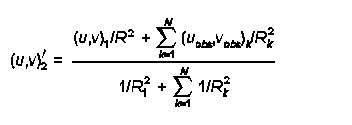
By setting R1 and R2 to small values (say of order 1 km or so), only when Rk is of order 1 km will the observation have much influence in developing the Step 2 winds. Typically, R1 and R2 are set to fairly small values, on the order of the grid scale size or less.
RMAX1 and RMAX2 - are also used in the construction of the Step 2 wind field, where the observed winds are 'blended' in with the Step 1 winds. Any observation for which Rk is greater than RMAX1 in the surface layer, or RMAX2 aloft, is excluded from the above 'blending' formula. We can use RMAX1 and RMAX2 to exclude observations from being inappropriately included (as they are in the next valley, on the other side of a mountain, etc.). If RMAX1 and RMAX2 are used to exclude observations, do not set LVARY to T, as CALMET will then increase the values or RMAX1 and RMAX2 to at least capture the nearest observation, regardless of whether this makes sense.
2.7.2 What options are available for initializing the wind field in CALMET, and how do I determine the best option for a particular application?
The following options are available for initializing the wind field in CALMET:
The first option, i.e., the use of WRF data, is preferred because it provides a spatially-varying wind field and takes into account geographic features to develop mesoscale flow patterns. The WRF data provide a good starting point in the form of an initial guess wind field which can be further refined within CALMET based on local topography and weather observations. The second option involves an objective analysis of all available surface and upper-air observations. This option will also generate a spatially-varying wind field. When using this option, the user is advised to allow the surface data to be extrapolated vertically, unless the surface data are strongly influenced by local terrain effects such as for stations located in a valley. See Section 2.2.1 of the CALMET user's guide for details.
The last two options are remnants of older versions of the model and are generally not recommended. The spatially-uniform guess field can be used for some near-field applications where on-site data are available. The DIAG.DAT file allows the user to initialize the wind field by layer. However, instead of inputting data via the DIAG.DAT file, it is recommended that the interpolation and spatial averaging routines within CALMET be used (via the second option above) to initialize the wind field.
2.7.3 How do I select the appropriate grid spacing for my application of CALMET?
The most appropriate grid spacing for a particular application of CALMET will depend primarily on the size of the domain of interest. For a long range transport application involving transport distances of 100 to 200 kilometers or more, the grid spacing will be larger than for an application involving near field impacts and complex flows. It is important to look at the terrain features within the domain, and ensure that the important features will be adequately resolved by the selected grid spacing (see discussion in Section 2.1, 4 of the FAQ). If the grid spacing is too large, then a valley may become discontinuous or an isolated hill may be smoothed out. One method for evaluating whether the grid spacing is adequate for a particular application is to select a light wind case where terrain induced flows will dominate and compare the resulting wind field using the selected grid spacing with a simulation using twice the resolution (half the grid spacing). If the wind field patterns are similar, then it is likely that the selected grid spacing is adequate. A typical application of CALMET on a PC will include about 100 to 200 grid cells in both the x- and y- directions. Therefore, for a domain that is about 200 kilometers on each side, a grid spacing of about 1 to 2 kilometers should be adequate. Smaller domains for near-field applications may require a grid spacing of about 250 meters. Use of 20 to 30 grid cells in each direction is generally not adequate, regardless of the size of the domain.
2.8.1 Can I use PRTMET to create a file that allows me to plot how meteorological conditions vary over time at a single receptor?
Yes, this option is available in PRTMET. The user can specify the grid points to process in the input control file and PRTMET will generate a time series at each of the grid points.
2.8.2 Can I use PRTMET to create files that will allow me to plot how meteorological conditions vary over the entire domain (or some subdomain)?
Yes, there is an option available within PRTMET that allows the user to create either a grid file (*.GRD) or an ASCII data file (*.DAT) in (X,Y,Z) format for the entire domain for any of the meteorological conditions. The *.GRD file can be input directly into Golden Software's SURFER utility to draw isopleths showing spatial variations of the specific meteorological condition or to create vector plots of winds. The *.DAT file can be input either into SURFER or any other plotting utility to generate various types of plots.
3.1.1 How can I treat monthly or seasonal variations in emission rates?
CALPUFF allows the input of variable emission rates. The following options are available, several of which are similar to those available in the EPA's ISCST3 model:
Each option is available for all source types (i.e., point, area, volume and line sources), with the exception of buoyant area sources for which only the last option (an external BAEMARB.DAT file) is available. To provide flexibility, the model allows the emissions for each source and each pollutant to vary on a different cycle.
The user is allowed to either enter actual emission rates or scaling factors for any of the above options. In other words, the user can either enter a unit emission rate in the source constant data (Input Groups 13b, 14b, etc.) and actual emissions in the source variable emissions data (Input Groups 13d, 14d, etc.), or an actual emission rate in the source constant data and multiplicative scaling factors in the variable emissions data.
3.1.2 How can I track the impact of one or more sources or source types?
The most straightforward way to keep track of impacts from different sources or groups of sources is to run each of them separately. The impacts from each individual model run can then be evaluated separately or combined using the CALSUM postprocessor.
Note that when sources are modeled in separate CALPUFF runs and chemical transformation calculations are performed, there may be a need to account for non-linear transformations resulting from varying background ozone and ammonia concentrations and relative humidity. The POSTUTIL postprocessor can be used for this purpose.
3.2.1 Where do I get background ozone data?
The ozone data are available from the following two sources:
AIRS (Aerometric Information Retrieval System) is a computer-based repository of information about airborne pollution in the United States and various World Health Organization (WHO) member countries. The system is administered by the U.S. Environmental Protection Agency (EPA), Office of Air Quality Planning and Standards (OAQPS), Information Transfer and Program Integration Division (ITPID), located in Research Triangle Park, North Carolina. AIRS is installed on the IBM computer system at the EPA's National Computer Center (NCC) in Research Triangle Park, North Carolina. Any organization or individual with access to the EPA computer system may use AIRS to retrieve air pollution data. To retrieve information directly from AIRS, you need to obtain an account on the EPA mainframe computer system and pay the applicable computer usage charges. Information about obtaining a computer account is available from the Technical Support Center (help desk) at the EPA National Computer Center (reachable at 800-334-2405 (toll free) or 919-541-7862).
Note that the AIRS ozone network provides hourly ozone concentrations only during the ozone
season (April-October) while CASTNET provides hourly data for the whole year.
Monitored ambient ozone concentrations can also be obtained from State and Local Ambient
Monitoring Stations (SLAMS) and National Ambient Monitoring Stations (NAMS) network.
While CASTNET stations are located in rural areas, the SLAMS/NAMS are mostly located in
urban areas. Further information regarding SLAMS/NAMS as well as AIRS summary data are
available at the EPA's AIRData
website
3.2.2 How can I vary the ozone background concentration for each grid square and hour?
The hourly ozone data file (OZONE.DAT) contains all available information supplied to the CALPUFF model, which includes station coordinates and the hourly ozone concentrations. The ozone data are normally not available for each grid cell. Therefore, within the CALPUFF model, the ozone concentration from the station that is nearest to the puff location during any given hour is used.
Note that although it is preferred to have a complete set of hourly ozone concentrations at each station, missing values are allowed in the OZONE.DAT file. For each puff, the value from the closest available station will be used by the model during each hour. If for any hour the values are missing from all stations, the model will use the appropriate backup monthly value provided by the user in the CALPUFF input control file.
3.2.3 Where do I get background ammonia data?
Ambient ammonia concentrations are normally not monitored. One source of ammonia concentrations is the Federal Land Managers' Air Quality Related Values Workgroup (FLAG, December 2000) document which provides three specific values depending upon land use, i.e., 10 parts per billion (ppb) for grasslands, 1 ppb for arid lands, and 0.5 ppb for forests.
It is also possible to account for ambient ammonia concentrations by specifically modeling sources of ammonia, which will keep track of ground-level ammonia concentrations with time and location. The modeled impacts can then be used by POSTUTIL to perform chemical transformation calculations.
3.2.4 How can I vary the background ammonia value?
Generally, background ammonia values are not varied due to lack of sufficient monitored data. However, when data are available, the most typical way to vary the background value is to provide 12 monthly values within the CALPUFF input control file.
Another option is to create an hourly-varying ammonia concentration file by modeling sources of ammonia within CALPUFF. CALPUFF will create this hour-by-hour, receptor-by-receptor concentration file (CONC.DAT), which can then be read into POSTUTIL to perform the chemical transformation calculations.
Although users have the option of creating their own hourly ammonia file using CASTNET data, there is currently no software available for this option.
3.3.1 Which CALPUFF settings typically require expert judgement for tailoring the analysis for a specific application?
CALPUFF provides default selections for most of the options. For most applications, the default options should be used. Depending on the application, however, there may be a need to deviate from the default selections under certain scenarios. Some such options are listed below with links provided to other FAQs for further discussion.
3.3.2 When should I use the slug option in the CALPUFF model?
A slug is simply an elongated puff. For most CALPUFF applications, the modeling of emissions as puffs is adequate. The selection of puffs produces very similar results as compared to the slug option, while resulting in significantly faster computer runtimes. However, there are some cases where the slug option may be preferred. One such case is the episodic time-varying emissions, e.g., an accidental release scenario. Another case would be where transport from the source to receptors of interest is very short (possibly involving sub-hourly transport times). These cases generally involve demonstration of causality effects due to specific events in the near- to intermediate-field.
3.3.3 What criteria should I use to determine whether or not to allow puff splitting in CALPUFF?
The decision to allow puff splitting is generally a subjective call, and there are no clear tests regarding when it should be done. There are two types of puff splitting: vertical and horizontal.
Vertical splitting slices the puff horizontally into NSPLIT puffs (the recommended default is 3). This provides a means for accounting for variation of the horizontal wind as a function of height, which is most prevalent at night (since convective mixing during the day decreases wind shear in the vertical). Usually, one can adequately address this effect by splitting puffs at night and then only once, near sunset (local hour 17). The longer the transport distances of concern, and the greater the possibility of tracking puffs for longer than 12 hours, the more likely the need to account for this effect.
For horizontal splitting, the issue is that of puff coherence. If the puff size becomes sufficiently large that it covers several grid cells, it may be advisable to split the puff because one large puff will not respond correctly to the cell-to-cell variability in meteorological conditions. Horizontal puff splitting becomes increasingly important with large transport distances (say 200-300 km). It may also become important at shorter distances if the grid cell size is very small.
Use of vertical or horizontal puff splitting may increase the dispersion of the puffs, which will increase the horizontal extent of the area affected and decrease the local maximum impact in comparison to not activating these options. Use of either vertical or horizontal puff splitting should be used cautiously because it splits each puff into say three puffs, which in turn could split into nine puffs, and so on, resulting in many puffs. CALPUFF has a limit to the number of puffs it can track (MXPUFF, see Section 3.3, 7 of the FAQ).
3.3.4 What are the various options available for selecting dispersion coefficients, and can I select options that are similar to other dispersion models such ISCST3, AERMOD and CTDM?
There are several dispersion options available within the CALPUFF model, which are selected via the MDISP parameter in the input control file.
The various options are described below.
MDISP = 1
Dispersion coefficients are computed from measured values of turbulence,
sigma-v and sigma-w. The user must provide an external PROFILE.DAT file
containing these parameters, and select a backup method out of options 2, 3 and 4
below in case of missing data.
MDISP = 2
Dispersion coefficients are computed from internally-calculated sigma-v, sigma-w
using micrometeorological variables (u*, w*, L, etc.). This option can simulate
AERMOD-type dispersion when the user also selects the use of PDF method for
dispersion in the convective boundary layer (MPDF = 1). Note that when
simulating AERMOD-type dispersion, the input meteorological data must be from
CALMET and cannot be ISC-type ASCII format data. The user should also be
aware that under this option the CALPUFF model will be more sensitive to the
appropriateness of the land use characterization.
MDISP = 3
Pasquill-Gifford (PG) dispersion coefficients for rural areas (computed using the ISCST3 multi-segment approximation) and McElroy-Pooler (MP) coefficients in urban areas.
MDISP = 4
Same as MDISP = 3, except PG coefficients are computed using the MESOPUFF II
equations.
MDISP = 5
CTDM sigmas are used for stable and neutral conditions. For unstable conditions,
sigmas are computed as in MDISP=3 described above. When selecting this
option, the user must provide an external PROFILE.DAT file, and select a backup
method out of options 2, 3 and 4 above in case of missing data.
The current default selection is MDISP = 3, which is ISC-type dispersion. Given the demonstrated improved characterization of dispersion provided by AERMOD, and EPA's decision to replace ISC with AERMOD, use of AERMOD-like dispersion (MDISP = 2, and MPDF = 1) may be more appropriate and will likely be of most benefit for short-range complex flow applications.
3.3.5 What criteria should I use to determine whether or not to use a) the CTSG option for subgrid-scale complex terrain, and b) the SGTIBL option for subgrid-scale coastal effects?
For long range transport applications involving analysis of Class I area impacts, the CTSG option is not usually considered since impacts on near-field terrain features are likely to be addressed by a model other than CALPUFF. For near-field applications involving complex flows, the grid spacing is generally small enough to resolve the terrain adequately. Therefore, the CTSG option is not commonly employed; however, the CTSG option in CALPUFF does allow the model to simulate impacts on significant terrain features that are not well resolved by the gridded terrain data. If such features exist, the user should first consider whether the grid resolution is adequate for the domain selected. If the grid resolution is determined to be adequate overall, but a terrain feature exists where impacts are of concern and the terrain is not sufficiently resolved by the gridded terrain data, the CTSG option may be appropriate.
The SGTIBL option for simulating subgrid-scale coastal effects should only be considered where the issue of coastal fumigation is thought to be important. Coastal fumigation is only of concern in cases involving tall stacks located close to the shoreline. The more general effects of land/sea breeze circulations on transport of the plume should be addressed through use of mesoscale prognostic meteorological data, such as WRF in the CALMET processing.
3.3.6 CALPUFF chemistry. What are the tradeoffs and known limitations between use of RIVAD and MESOPUFF II, a) with respect to setting model options and defining model input and b) with respect to effects on modeling results?
The difference between the two options is that RIVAD is a six-species scheme wherein NO and NO2 are treated separately, while MESOPUFF II is a five-species scheme in which all emissions of nitrogen oxides are simply input as NOx. Unlike the MESOPUFF II scheme, the RIVAD scheme does not assume an immediate conversion of all NO to NO2. Therefore, in order to use the RIVAD scheme, the user must divide the NOx emissions into NO and NO2 for each source.
Another difference is that in the MESOPUFF II scheme, the conversion of SO2 to sulfates is dependent on relative humidity (RH), with an enhanced conversion rate at high RH. In the RIVAD scheme the conversion of SO2 to sulfates is not RH-dependent. The conversion of NOx to nitrates is RH-dependent in both the schemes.
In several tests conducted to date, the results have shown no significant differences between the modeling results for the two options. For any regulatory applications, the user should consult with the relevant reviewing authorities regarding the selection of the chemical transformation scheme for the particular application.
3.3.7 How do I solve the problem of too many puffs in my CALPUFF run?
The CALPUFF modeling system provides three executables with increasing array sizes for each of the main modules, i.e., CALMET, CALPUFF and CALPOST. The maximum number of puffs allowed is controlled by the MXPUFF parameter in the model code. If for a given application the number of puffs being generated exceeds the MXPUFF parameter, the user can select an executable with higher array limits. The user may also increase the MXPUFF parameter and recompile the code to produce a new executable.
If the user has selected puff splitting, this option could also result in an exceedance of the MXPUFF parameter. To resolve this problem, the user can consider reducing the number of puffs into which each original puff is split. In the case of horizontal splitting, the user can also change the CNSPLITH parameter which stops further splitting of a puff once it has reached a certain dilution in the atmosphere. CNSPLITH is a concentration level below which puffs are not split, and can be specified either as a single value for all species being modeled or as separate values for each individual species. For further discussion on puff splitting, see Section 3.3, 3 of the FAQ).
The number of sources in a single CALPUFF run can also be reduced, thereby reducing the number of puffs generated. More CALPUFF runs would be needed, and the resulting output files can be combined prior to using CALPOST.
4.1.1 How can I splice together separate CALPUFF runs that are tracking separate sources or source types?
When modeling sources in separate CALPUFF runs, the output data files created by CALPUFF can be combined using CALSUM to create a single data file containing the cumulative impacts. The data files that are combined can either be the concentration files or the deposition flux files. The user must ensure that the files being combined cover identical time periods, have the same number of receptors, that and all receptors were modeled in the same order in each CALPUFF run.
Note that the results in each data file can be scaled prior to being summed. See further discussion in Section 4.1, 2 of the FAQ.
Here's a sample of the CALSUM input file. Note that the input file names and the scaling factors are repeated as many times as the number of files being combined. The last three lines of input are the run title.
2 - Number of files to be combined
cpuf1.con - INPUT file name (file #1)
cpuf2.con - INPUT file name (file #2)
cpufsum.con - OUTPUT file name
T - Compression flag for OUTPUT file (T=True, F=False)
5 - Number of species
.5 .0 .5 .0 .5 .0 .5 .0 .5 .0 - Scaling factors (aX+b) for each species and file
.5 .0 .5 .0 .5 .0 .5 .0 .5 .0 - Scaling factors (file #2)
CALSUM output file - Example CALPUFF Application
Sum of concentrations from 2 identical CALPUFF Files
Scale values by 0.5 before summing
4.1.2 Can I "adjust" source emission rates in CALSUM after CALPUFF has completed its run?
When modeling sources in separate CALPUFF runs, the output data files created by CALPUFF can be combined using CALSUM to create a single data file containing the cumulative impacts. The results in each data file can be scaled prior to being summed. The scaling factors are specified by the user and can be different for each species and each input data file. Therefore, if each source is modeled separately, CALSUM can be used to adjust emissions rates via the use of these scaling factors.
The ability of CALSUM to scale impacts can be beneficial in many applications. For example, when modeling net PSD increment consumption, the increment consuming and the increment expanding sources can be modeled separately and combined in CALSUM by specifying scaling factors of +1.0 and -1.0, respectively, for the two runs. Then, CALPOST processing on the resulting file can summarize the net increment consumption.
Here's a sample of the CALSUM input file. Note that the input file names and the scaling factors are repeated as many times as the number of files being combined. The last three lines of input are the run title.
2 - Number of files to be combined
cpuf1.con - INPUT file name (file #1)
cpuf2.con - INPUT file name (file #2)
cpufsum.con - OUTPUT file name
T - Compression flag for OUTPUT file (T=True, F=False)
5 - Number of species
.5 .0 .5 .0 .5 .0 .5 .0 .5 .0 - Scaling factors (aX+b) for each species and file
.5 .0 .5 .0 .5 .0 .5 .0 .5 .0 - Scaling factors (file #2)
CALSUM output file - Example CALPUFF Application
Sum of concentrations from 2 identical CALPUFF Files
Scale values by 0.5 before summing
4.2.1 I need to split my CALMET run into smaller time periods due to file size limitations. How can I do this, and are there any special considerations (e.g., overlapping periods at beginning and end of each segment)?
When applying CALPUFF separately with meteorological data that is split into multiple consecutive time periods (e.g., 12 monthly runs for one full year), it is necessary to account for puffs that are remaining at the end of one time period in the next time period. One way to accomplish this is to model overlapping time periods, e.g., each monthly run should start with a few days of meteorological data (say three days) from the previous month. The other option is to use the RESTART option in each monthly run wherein CALPUFF will first initialize the domain with the puffs remaining from the previous month.
If all of the CALMET files are available on disk, a single CALPUFF application can be made. Simply list the CALMET file names in the CALPUFF input control file, and the model will access these in sequence.
If multiple CALPUFF runs are made, the APPEND program can be used to append the sequential output data files into a single file for CALPOST processing. The data files that are appended can either be the concentration files, deposition flux files, or the visibility data files. Note that the number and the order of the receptors must be identical in each CALPUFF run. Overlapping time periods between multiple runs are not a problem because the user can specify the number of hours to skip at the beginning and the total number of hours to read from each file.
Here's a sample of the APPEND input control file. Note that the input filenames, the number of hours to skip, and the ending hour are repeated as many times as the number of files to be appended. The last three lines are the run title. In this example, the runs for January, February and March for a non-leap year are being appended, and the user had an overlap of three days between the months.
1 - File type (1=conc/flux files, 2=RH/visibility files)
3 - Number of input data files
cpuf1.con - File name (file #1)
0, 744 - Number of hours to skip, total hours to read from file #1
cpuf2.con - File name (file #2)
72, 744 - Number of hours to skip, total hours to read from file #2
cpuf3.con - File name (file #3)
72, 816 - Number of hours to skip, total hours to read from file #3
cpufapp.con - Output data file name
APPEND Demonstration
Reconstructing CALPUFF concentration file
Combine January, February and March runs, skip the 3-day overlap
4.3.1 How can I get total Sulfur and total Nitrogen deposition amounts?
The CALPUFF output files will contain the wet and dry deposition fluxes of both primary and secondary species. Wet fluxes are reported in one file, and dry fluxes are reported in another. The wet and dry fluxes must be added to obtain the total flux of each species, at each receptor, each hour. Furthermore, these fluxes are for the modeled species and so do not represent the mass flux of either sulfur or nitrogen. The deposition flux of sulfur includes contributions from SO2, SO4, and any other modeled sulfur compounds. The deposition flux of nitrogen includes contributions from NOx, NO3, HNO3, SO4, and any other modeled nitrogen compounds. Note that sulfate (SO4) and nitrate (NO3) are deposited as ammonium sulfate and ammonium nitrate and therefore carry nitrogen in the ammonium portion of the compound.
The POSTUTIL processor can be configured to sum the wet and dry fluxes, and to 'compute' the total sulfur and nitrogen contributed by the modeled species. The resulting sulfur and nitrogen fluxes are written to the output file for subsequent CALPOST processing. Typically, species names S and N are given to these computed species.
5.1.1 What are the differences and tradeoffs between the different options provided for computing regional visibility impacts?
The calculation of regional visibility impacts in CALPUFF takes into account the scattering of light caused by several particulate matter (PM) constituents in the atmosphere. This scattering of light is referred to as extinction. The PM constituents that are accounted for in the visibility calculations include ammonium sulfate, ammonium nitrate, organic carbon, elemental carbon, soil, and coarse and fine PM. While most of these constituents are considered to be naturally occurring, an individual source may typically only emit fine PM and contribute to sulfate and nitrate formation via SO2 and NOx emissions. The CALPUFF model calculates the light extinction attributable to a source's emissions and compares it to the extinction caused by the background constituents to estimate a change in extinction.
The extinction caused by a source's emissions is affected by several factors. One such factor is the formation of light scattering constituents by chemical transformation during plume transport, e.g., conversion of SO2 to sulfates and NOx to nitrates. These chemical transformations are dependent on the level of available gaseous ammonia and ozone in the atmosphere (i.e., the higher the ammonia and ozone concentration in the air), the greater the transformation, and hence the greater the light extinction. Therefore, it is recommended that area-specific background concentration levels for these gases should be used.
Since sulfates and nitrates are hygroscopic in nature, the light extinction caused by these constituents is also affected by relative humidity (RH). The other PM constituents are considered to be non-hygroscopic. For details on how the light extinction is calculated consult the IWAQM Phase II report and the Federal Land Managers' Air Quality Related Values Workgroup (FLAG, December 2000) document.
CALPOST provides six options to compute the background light extinction via the specification of the MVISBK parameter in the CALPOST input control file. The six options are as follows, with the default option being MVISBK=2.
MVISBK=1
The user supplies a single light extinction and hygroscopic fraction for the background. The
Interagency Workgroup on Air Quality Modeling (IWAQM 1993) RH adjustment
is applied to hygroscopic background and the modeled sulfates and nitrates.
MVISBK=2
Computes extinction from user-specified speciated background PM measurements. Hourly
RH adjustment is applied to both the background and the modeled sulfates and
nitrates using hourly RH data from a file created by CALPUFF (VISB.DAT). The
RH factor is capped at a user-specified RHMAX (default 98%). The Rayleigh
extinction value (BEXTRAY) is added to the computed background extinction.
MVISBK=3
Computes extinction from user-specified speciated background PM measurements. Hourly RH adjustment is applied to both the background and the modeled sulfates and nitrates using hourly RH data from a file created by CALPUFF (VISB.DAT). Unlike MVISBK = 2, the hours with RH>RHMAX are excluded, and any receptor-day with fewer than 6 valid receptor-hours is also excluded. The Rayleigh extinction value (BEXTRAY) is added to the computed background extinction.
MVISBK=4
Reads user-supplied hourly transmissometer background extinction measurements. Hourly RH adjustment is applied to the modeled sulfates and nitrates using hourly RH data from a file created by CALPUFF (VISB.DAT). Any hours with an invalid measurement are excluded. Also, the hours with RH>RHMAX, and any receptor-day with fewer than six valid receptor-hours, are excluded.
MVISBK=5
Reads user-supplied hourly nephelometer background extinction measurements. The Rayleigh extinction value (BEXTRAY) is added to the measurements. Hourly RH adjustment is applied to the modeled sulfates and nitrates using hourly RH data from a file created by CALPUFF (VISB.DAT). Any hours with an invalid measurement are excluded. Also, the hours with RH>RHMAX, and any receptor-days with fewer than six valid receptor-hours, are excluded.
MVISBK=6
Computes extinction from user-specified speciated PM measurements; however, unlike MVISBK = 2, the RH adjustment that is applied to both the observed and the modeled sulfates and nitrates is based on user-specified monthly RH factors. The Rayleigh extinction value (BEXTRAY) is added to the computed background extinction.
5.2.1 Can I use CALPOST to create a file that allows me to plot how concentrations vary over time at a single receptor?
CALPOST provides the option to select specific receptors to process and generate time series for any type of output for specific days out of the modeling period.
5.2.2 Can I use CALPOST to create files that will allow me to plot how concentrations vary over the entire domain (or some subdomain)?
Yes, there is an option available within CALPOST that allows the user to create either a grid file (*.GRD) or an ASCII data file (*.DAT) in (X,Y,Z) format for the entire domain for any of the output types (concentrations, deposition rates, etc.). The *.GRD file can be input directly into Golden Software's SURFER utility to draw isopleths showing spatial variations of the output type. The *.DAT file can be input either into SURFER or any other plotting utility to generate various types of plots.
The user can either select the entire modeling domain, or chose to select or exclude any part of the domain for the plot files. For example, the user could exclude the on-site receptors or select one Class I area out of several areas modeled in a single CALPUFF run.